Thing which seemed very Thingish inside you is quite different when it gets out into the open and has other people looking at it
Showing posts with label Music Technology. Show all posts

Friday, August 3, 2012

Creating Music Notation using LiliPond

Lilipond is a music engraving program, which produce high quality music notation and send them into PDF format. One of the most interesting thing you can do using lilipond is, you can use lilipond for your music programming. If you follow their syntax properly you can create music applications very easily.


Lets get a kick start on lilipond.
Before you begin you need to download lilipond depending on your operating system.

For this demostration I am going to show how you can create the popular song "Twinkle Twinkle Little Star" Using lili pond.

There are three main things we need to consider when creating a song.in lili Pond

1. How to create the melody ? (the treble clef notes)
2. How are we going to accompany them? (base notes)
3. Are we going to produce a midi file to our notation.

Creating a melody

In lilipond most of the pitches can be given relatively to a given octave. for example

\relative c {
  \clef bass
  c d e f
  g a b c
  d e f g
}
 

Above notes are relative to the middle octave. And if you want to create octaves lower o higher you can use " ,  " (comma)  or " ' ". This is called octave changing mark in lilipond. And also default time signature is 4/4 and default clef is treble clef. Sharp {#} are defined as ("is") and flats (b) are defined as ("es"). For example if you want to create a# then the notation is like "ais". Ok those are the very basic principles of lilipond but if you want to create more complicate notations please refer the use guide.

Lets start our song. Here we are not using relatives we are using standard notation. So I am going to create a lead sheet which only has the treble clef notes and the chords are indicated on top of each bar.

\score {
{
<<
\chords  {f1 c1 g1 d1:m g1 d1:m f1 c1  }
\new Staff { \time 4/4c'4 c'4 g'4 g'4 a'4 a'4 g'2 f'4 f'4 e'4 e'4 d'4 d'4 c'2 f'4 f'4 e'4 e'4 d'4 d'4 c'2 f'4 f'4 e'4 e'4 d'4 d'4 c'2 }
>>
}
 \layout { }
\midi { }
}

Score represents its a lead sheet. And to represent chords  you need the notation "\chords" here you can define what type of chords you want and the duration on that chord.
   f1 - means fmajor and it will last  4 beats (breave).
   d1:m - means its DMinor it will also last 4 beats.
Like wise you can define your codes

By using new Staff you can give music notations such as crochests, minims rest etc depending on the cleff. If you dont have a clef then the default is treble. you can also define time signature, And the duration of the notes are given by numbers. C4 - one beat C2 - two beats , C1- four beats etc.

Lets look at our twinkle twinkle song notation

Creating MIDI

 
If you want to create a midi file as well you need to put /midi() then it will create a midi file of the song you created.

Creating Piano sheets

Creating piano sheets can also be done similarly. Only difference is you need have two staves other than one.

Example ..

\relative c'' {
  \new PianoStaff <<
    \new Staff { \time 4/4 c4 e8 g8 g4, e4 e}
    \new Staff { \clef bass c,2 e4 g e2 b'4 g}
  >>
}

Creating Fret Sheets.

If you want to create guitar tabs for notation for your songs there is an option to create fretsheets. In order to do that you need to include FretBoards  liberary and give your notation as shown below.

Example...
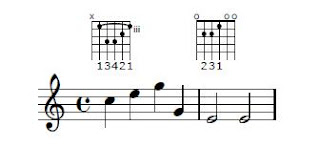
\include "predefined-guitar-fretboards.ly"
<<
\context FretBoards {
  \chordmode {
    c1:m e
  }
}
\relative c'' {
    \new Staff { \time 4/4 c4 e g g, e2 e} 
}
>>


Sunday, October 9, 2011

Adding Chords to your melody using jMusic (Adding Accompaniments)


In my last post I showed how we can easily create a song (twinkle twinkle little star), which is basically the tune of that song or in western music language we call it the melody, in this post I am going to talk about how we can accompany this melody by adding chords.
Let’s see how we can accompany our melody ..

This is in our today’s TODO list
-          Adding Chords to our song
-          Arranging the chords in choral fashion
-          Adding  guitar chords (o any other instruments)

Adding Chords to the song “Twinkle twinkle”


Following diagram shows the chord arrangements for the song twinkle Twinkle however this is not static you can select appropriate chord of your choice depending on the mood and the sound you want. However let’s just use a very basic chord progression to our song.

Since we already created our song in my last post I will use the same code to add chord progression.

When we were creating the notes we needed a pitch array which is an integer array to store the notes(pitch classes), likewise we need Chord array to keep Chord structure.  

A Chord represents 3  or 4 notes together playing at once.  So I am going to create array of three notes for each of our chord. 

Here we need  3 Types of  Chords
Chord Notes
CMaj C E G
FMaj F A C
GMaj G B D

Adding  Chords is bit complicated than just creating notes therefore, I will explain simple as possible. 

Here we are going to have two parts. First one is our melody line(tune) which we created earlier. And the other part is the base part (the chords) to accompany our melody.

   Phrase phr = new Phrase("Twinkle twinkle", 0.0);
        Part treblePart = new Part("PIANO-Right", PIANO, 0);
        int[] pitchArray = {C4, C4, G4, G4, A4, A4, G4, F4, F4, E4, E4, D4, D4, C4, G4, G4, F4, F4, E4, E4, D4, G4, G4, F4, F4, E4, E4, D4};
        double[] rhythmArray = {C, C, C, C, C, C, M, C, C, C, C, C, C, M, C, C, C, C, C, C, M, C, C, C, C, C, C, M};
        phr.addNoteList(pitchArray, rhythmArray);
        treblePart.add(phr);

And then we create the base part
static Part bassPart = new Part("PIANO-Left", PIANO, 0);

To create chords we need to define each type of chord we are using. First we’l creates our three types of chords.

        Note cMaj[] = {new Note(C3, M), new Note(E3, M), new Note(G3, M)};
        Note fMaj[] = {new Note(F3, M), new Note(A3, M), new Note(C3, M)};
        Note gMaj[] = {new Note(G3, M), new Note(B3, M), new Note(D3, M)};


Earlier I created a Phrase  to store the pitch classes (notes) and their durations (time slots) here we need to create a  CPhrase chord = new CPhrase(); to store our chords. 
And we add each chord to the basePart to complete the phase.

So to make this code much efficient and elegant I am going to create a separate method which adds a given chord to our basePart.

public static void addChordsPart(Note chrd[]) {
        CPhrase chord = new CPhrase();
        chord.addChord(chrd);
        bassPart.addCPhrase(chord);
    }

Getting things all together
  1. Create two parts
  2. Add the melody to the first part by giving the pitch classes and durations
  3. Create the types of the chords
  4. Add each chord to the second part by giving the chord name and their duration per each chord
  5. Create the Score and add Part one and part two together
  6. Play/Save the midi

package mymusicapp;

import jm.JMC;
import jm.music.data.CPhrase;
import jm.music.data.Note;
import jm.music.data.Part;
import jm.music.data.Phrase;
import jm.music.data.Score;
import jm.util.Play;
import jm.util.Write;


public class Main implements JMC {

    static Part bassPart = new Part("PIANO-Left", PIANO, 0);

    public static void main(String[] args) {
        Phrase phr = new Phrase("Twinkle twinkle", 0.0);
        Part treblePart = new Part("PIANO-Right", PIANO, 0);
        int[] pitchArray = {C4, C4, G4, G4, A4, A4, G4, F4, F4, E4, E4, D4, D4, C4, G4, G4, F4, F4, E4, E4, D4, G4, G4, F4, F4, E4, E4, D4};
        double[] rhythmArray = {C, C, C, C, C, C, M, C, C, C, C, C, C, M, C, C, C, C, C, C, M, C, C, C, C, C, C, M};
        phr.addNoteList(pitchArray, rhythmArray);
        treblePart.add(phr);

        Note cMaj[] = {new Note(C3, M), new Note(E3, M), new Note(G3, M)};
        Note fMaj[] = {new Note(F3, M), new Note(A3, M), new Note(C3, M)};
        Note gMaj[] = {new Note(G3, M), new Note(B3, M), new Note(D3, M)};

        addChordsPart(cMaj);
        addChordsPart(cMaj);
        addChordsPart(fMaj);
        addChordsPart(cMaj);
        addChordsPart(fMaj);
        addChordsPart(cMaj);
        addChordsPart(gMaj);
        addChordsPart(cMaj);
        addChordsPart(cMaj);
        addChordsPart(fMaj);
        addChordsPart(cMaj);
        addChordsPart(gMaj);
        addChordsPart(cMaj);
        addChordsPart(fMaj);
        addChordsPart(cMaj);
        addChordsPart(gMaj);

        Score score = new Score("Twinkle-Twinkle");
        score.addPart(treblePart);
        score.addPart(bassPart);

        Play.midi(score);
        Write.midi(score);

    }

    public static void addChordsPart(Note chrd[]) {
        CPhrase chord = new CPhrase();
        chord.addChord(chrd);
        bassPart.addCPhrase(chord);
    }
}


Now we added chords to our songs. You can try out the songs by simply playing the song.

Arranging  the chords.

Just playing the chord progression for a song can be lil boarding. To make the song more interesting we can arrange the base chords into different variations. 

Following diagram shows how we can arrange the chords using each note of the chord.

So for that we need to change our method a little bit by giving the notes of each chord separately and  arranging them with proper durations.

 public static void addbaseNotesPart(Note chrd[]) {
        Phrase chord = new Phrase();
        int[] pitchArray = {chrd[0].getPitch(), chrd[2].getPitch(), chrd[1].getPitch(), chrd[2].getPitch()};
        double[] rhythmArray = {Q, Q, Q, Q};
        chord.addNoteList(pitchArray, rhythmArray);
        bassPart.addPhrase(chord);
    }

We can use the same code, but instead of using addChordsPart, use addbaseNotesPart to get the styling of our chord progression.


Adding  guitar chords (o any other instruments)

This Chord Arrangements can be done using any instrument. All you need to do is change the  Part instrument to the instrument of your choice.
  static Part bassPart = new Part("PIANO-Left", GUITAR, 0);

You can also experiment by changing the chords/durations and adding new parts. 


Tuesday, September 27, 2011

Kick Start on Music Programming – Create your first music program in java

In this tutorial I am going to talk about basics of music programming and music technology. Music programming is an interesting but a very vast area of learning and applying however, jMusic project makes music programmer’s life much easier and makes music programming more effective. jMusic library is an API for Java music programming and provides tools to for music compositional and audio processing.

Today I am going to talk about the fundamentals of music programming using jMusisc library and compose, and process and monitor simple music.

Today's TODO list ...
  1. Create a Simple Song
  2. Add Instrumentals
  3. Save and notate
Create Your First Song 

Creating your first song is crucial :) If you know the music notation to a particular song you can create almost any song using this technique (make sure you select your favorite song for this task) . Since most people know twinkle twinkle little star and its quite catchy I am going to select that song.

Before we start we need to make sure we have jMusic library, you need to download and import this library to your java class path.
First look at the manuscript notation of our songs.

For those who are not fluent with music notations and western music theory this is how it looks likes in abc format. (More like c,d,e,f,g format :) )


Now let's create this song in java.
package mymusicapp; 
import jm.JMC; 
import jm.music.data.Note;  
import jm.music.data.Part; import jm.music.data.Phrase; import jm.music.data.Score; import jm.util.Play;
import jm.util.Write;
public class Main implements JMC {
public static void main(String[] args) { 
Phrase phr = new Phrase("Twinkle twinkle", 0.0); int[] pitchArray = {C4,C4,G4,G4,A4,A4,G4,F4,F4,E4,E4,D4,D4,C4,G4,G4,F4,F4,E4,E4,D4,G4,G4,F4,F4,E4,E4,D4};
double[] rhythmArray = {C, C, C, C, C, C, M, C, C, C, C, C, C, M, C, C, C, C, C, C, M, C, C, C, C, C, C, M}; phr.addNoteList(pitchArray, rhythmArray);
Play.midi(phr);}
}
}
As you can see it is very easy to create music using jMusic library. All you need to do is add the notes and the pitch classes and put them together. If you look at it closely, Notes are given in “pitchArray” int array of pitch classes in C,D,E,F,G manner number 4 represents the fourth octave. And the duration of each pitch classes are given Crochet ( C ), Quaver (Q), Semi Quaver (SQ), Minim (M) ect.
Following table list duration of each note.


Musical Notation Name Duration jMusic Notation
Semibreve

Whole Note
4 Crotchets
4.0 SB
Minim

Half Note
2 Crotchets
2.0 M


Crotchet

Quarter Note
1 Crotchets
1.0 C
Quaver

Eight Note
½ a Crotchet
0.5 Q
Semi-Quaver

16th note
¼ a Crotchet
0.25 SQ


Add Instrumentals

Changing the instrument is easier than creating the song all you need to do is map your phrase to a part and play the part as shown below.

phr = new Phrase("Twinkle twinkle", 0.0);
Part p = new Part("FLUTE", FLUTE, 0);  
phr.addNoteList(pitchArray, rhythmArray);
p.add(phr);
Play.midi(p);

You can try and experiment with different musical instruments such as guitar violin ect. :)


Save and notate

You can save your creation as a midi file by simply adding the following code.
Write.midi(phr,"twinkle.mid");


Click here to listen to our creation

To view the manuscript notation you can use View.notate method and you can view the manuscript notation of your music creation.

View.notate(phr);

Wednesday, November 24, 2010

Create Your Own Music Using ChordATune

ChordATune is a music making software where users can create their own creative music and mabe use them to create birthday cards, home made videos, play it using your guitar .. and many more. ChordATune also allows you to harmonize a known song and find their accompaniments.
In this section I will give you a step by step guide on how you can create music using ChordATune .

1. Creating a song.

There are several ways to create melodies in ChordATune.
  1. Using an existing midi file (if you have an already exsisting melody and don't know how to get the base chords) ..
  2. Using a manuscript Editor - ChordATune provides a well known tools to create manuscript notations (if you know your music theory)
  3. Using a virtual Piano.
I will explain how you can create your own melodies using the virtual piano provided by ChordATune

In the main frame of ChordATune, under creation mode select piano from the drop down list and click on create a song.

Then you will get a virtual piano as shown below ..


Here you can click on the key board and create your melody once you create the melody you can click on play to listen to your creation. If you don't like the sound of it you can click on edit and delete the unnecessary notes. If you don't like the entire melody you can click on clear and start over. To view your melody in a manuscript notation click on view. Once you are done click on save to save your creation. :)


2. Generating the harmony

Now that you have a melody you need to generate the harmony (base chords) to accompany you melody. In order to harmonize you need to follow the following steps
  1. Select the time signature (in simple terms its the beat of your melody)
  2. Input the midi file (the melody you just created) - you can listen to the melody once u input the melody
  3. Giving the emotional factor (harmony depends on user emotions therefore its important to specify what kind of song you want ie a happy song, sad song ect (if you don't like a particular harmony generated by ChordATune you can always change the emotional factor and get a complete different harmony.
  4. Generate Harmony

3 . Display Harmony

Once you generate the harmony there are several options to display the harmony.

  1. Selecting the genre - You can select the genre(style) of your choice while displaying the harmony. There are several styles allowed in ChordATune. (ie Rhumba, Swing, Disco, Rock, March)
  2. Selecting the drum beat - According to the genre users can select different drum beats)
  3. Changing the tempo - if you want to change your tempo of your song you can change the tempo using this functionality
  4. Display the harmony


Now you know how to create a simple song using ChordATune. It is advice to give different variations and experiment with your creation by choosing different emotional factors/ changing the genre/drum beat and tempo to get the best result of your choice. This way you can add your own creativity to your song.


ChordATune also allows you to generate the guitar tabs (fingering positions of guitar chords) for you melody for the guitar players :) by selecting the display style as guitar.


ChordATune also allows you to print your music as sheet music by clicking display printable version.


Now you can go to your piano/guiatar and play your music !!!

Monday, July 26, 2010

Music Technology & ChordATune

The aim of the ChordATune system is to give a clear understanding of harmonization to novice pianists, and to create accompaniments that are musically correct. Since there can be more than one accompaniment for a given melody, ChordATune allows variations of accompaniments according to the emotional factor of the composer and the genre of music.


ChordATune has the functionality of creating new melodies using a manuscript notation or using a virtual piano, and also to browse melodies in MIDI format to be inserted into the system as input. The ability to set the emotional factor to any level of happiness or sadness lets the user generate different types of harmonies to the same melody based on different emotions ranging from happy to sad. Furthermore users can change the harmony by changing the genre, drum beat and its tempo. Once the harmony is generated it can be displayed in different genres and styles according to the manuscript notation. Furthermore, ChordATune possesses the capability to provide guitar chords in fret sheets for a given melody; this helps novice guitarists to learn chords and fingerings for new melodies. Once the accompaniments are generated they can be played as audio files. The generated accompaniments can be saved as MIDI files or manuscript notation.

Saturday, June 12, 2010

Why Harmonization ? - Importance of harmonizing a melody


One of the biggest problem in song writing or piano playing (o creating your own music) is the problem of harmonization. In this blog I discuss why harmonization is crucial (getting the right chords to the right notes) and how we can overcome this problem using and interactive tool called ChordATune.

Power of harmonization
Play Melody
Play Harmonized Melody


Music is made out of melody and harmony. Melody is the basic tune of a song (which we can easily hum o we can just guess the notes using a keyboard). Harmony on the other hand is the accompaniments to a melody (base chords, drumbeats ect) which makes your song complete. Harmonization is a crucial part in song writing o piano playing because only by harmonization you can make your melody rich and power and also add emotions and color to your song. However, many people face the problem of harmonizing because you need extensive knowledge in music, years of training and practice and also some musicality in you to harmonize a song accurately.

This is where the ChordATune comes in handy... ChordATune is a powerful harmonization tool. Not only just harmonization, you can also create your own melodies the way you want (using a virtual piano or manuscript editor) and make it complete by harmonization. ChordATune let user have variety of harmonies according users emotions and styles and also provide drum beats to make your song have a rocking beat!!.ChordATune output the harmonize melody in manuscript and midi formats. ChordATune also provides a feature of guitar players where they can get guitar chords in guitar tabular format for an any given tune.

Now you can create your own music the way you want and also ChordATune provides a mechanism to save your creations in MIDI format so that you can use ur music for many other activities in your digital life.

Thursday, May 20, 2010

ChordATune - A Solution for Song writing and piano music harmonization

I decided to use this blog for technical purposes (not too geeky but interesting work in the computer field) I am starting with my favorite!! one of my own creations "ChordATune"..
ChordATune is an emotion based melody/tune harmonizer focusing on piano music. One of the biggest problem in song writing or piano playing is the problem of harmonization. Most people know how to write beautiful songs o play creative tunes but they find its hard to accompany their tune with the adequate chords. This problem is addressed by ChordATune which gives you the chance to accompany your melody with chords according to your emotions, styles drum beats and tempo.

ChordATune features

  • Create your own melodies using a virtual piano/ a manuscript editor.
  • Generate harmony according to emotions interactively (If you don't like the harmony u can always change the emotional factor o the genre and get a complete different set of chords).
  • Add Drum beats to your melody
  • Arrange harmony according to the genre (user preferred style ie Disco, Rhumba, Swing, March, Rock).
  • Change the tempo.
  • Display guitar tabular format (guitar chords ) for a tune.
  • Generate manuscript notation to your harmony/melody
  • Save MIDI files/Manuscript files in PDF format
  • Play Stop Print functionality
Check out ChordATune in action

http://www.youtube.com/watch?v=I3ZeizWDnOc

In case if you are interested in the technical background ...

ChordATune uses machine learning technology to generate the most suitable chords for a given melody... it can be called as an interactive AI system where the AI properties are created dynamically at run time according to the user input. This uses Hidden Markov Model which is a statistical mathematical model to generate the chord progression. Further, ChordATune is based of Music Technology, MIDI processing, Dynamic Programming, Multi Processing and Automatic Music Composition. Around 300 lead sheets are used to train ChordATune using heuristic and data driven approaches.

Sunday, April 18, 2010

Introduction to Computer Music Harmonization


Automatic harmonization history 

Among musical compositional systems there has been a large number of researchs carried out in the field of automatic harmonization from the early 1950s onwards. When looking at automatic harmonization history the most pioneering work in automatic harmonization is that of Rothgeb who developed a SNOBOL, program to solve the harmonization problem and to identify the voice leadings notes to accompany it. Rothgeb used rule base approach that has a set of ‘if statements’ according ot the musical domain. His main aim was not focusing on automatic harmonzation but to test the computational soundness of two bass harmonization theories from the eighteenth century (Rothgeb, 1969). Afterwards Steals in 1979 proposed a system to use constraints to create passing chords as chords that could be inserted between two given chords. These passing chords must satisfy some musical constraints, such as interval relations between the roots of the first, passing, and last chords. Further, Steals used essentially a frame system, augmented with a bread-first search (Steals, 1979).
The above evidence suggests that the first works for automatic harmonization were carried by using rule base approaches by representing set of musical rules. Furthermore, this indicates that no constraint satisfaction algorithm was used and the main concern was about mastering the combinatorial explosion, by putting more knowledge in the solver.

Automatic Harmonization – AI Techniques

There have been several approaches taken for automatic harmonization in artificial neural networks (ANN). There has been a large number of research carried out in the field of music composition using neural networks available in the literature; Todd (1989, 1991) used a feed-forward ANN with feedback for melody generation, Lewis (1991), Hild et al. (1992) used a neural network to harmonize chorales that divides harmonization in to three parts 1) harmonic skeleton 2) chord skeleton and 3) ornamentation, Mozer (1991, 1994) generated melody using ANN, Stevens and Wiles (1993), Bellgard and Tsang (1994) constructed a Boltzmann machine for harmonization which generates harmonies non-deterministically. Further, Toviainen (1995) trained neural networks for jazz improvisation and later Hörnel and Degenhardt (1997) generated harmonization for four part chorals in baroque style.
The most of the automatic harmonization used neural networks are for four part choral harmonization. Automatic harmonization using neural networks, Schwanauer the developer of MUSE that harmonize chorals, claims that there are five learning techniques learning by rote, learning from failure, learning from examples, learning by analogy and learning from discovery (Schwanauer,1993).
Even though neural network approaches are widely used among musical composition systems Papadopoulos and Wiggins discusses that there are many disadvantages in neural network approach for musical compositions, in his analysis he claims that “The representation of time cannot be dealt efficiently even with ANNs that have feedback” (Papadopoulos & Wiggins, 2007). Further, he states that neural networks cannot reproduce fully trained data set. Even if they are fully trained it is not generalized (Papadopoulos & Wiggins, 2007). Toviainen (1999) claims that neural networks fail to pick up the higher-level features of music such as phrasing or tonal functions. Further, he explains that a neural network often solves toy problems, with many simplifications when compared to knowledge based approaches (Toiviainen, 1999). However, the review reveals that the neural network approaches used for musical compositions suggests that neural networks were used extensively in the past years for musical applications and they have been relatively successful especially in domains such as perception and cognition.

Automatic harmonization – Knowledge Based Systems  

The most pioneer technique used for music composition is using knowledge base concepts. Unlike neural network that learns from examples, knowledge based systems work according to the rules. There can be three types of knowledge based systems 1) rule based expert systems, Constraint logic programming and case based reasoning. There has been several approaches on automatic harmonization using rule based approach. Ebcioglu implemented a choral harmonizing system which is a rule based expert system using Backtracking Specification Language (Ebcioglu, 1988). Tsang and Aitken (1991) and Pachet and Roy (1998) used constraint logic programming (CLP) and constraint satisfaction techniques (CSP) respectively for four part choral harmonization. However, Sabater et al also developed four part automatic harmonization for vocals using rules and cased based reasoning but his approach failed due to constructing the harmonization purely on rules. Reason for his failure was because rules don’t make music but music makes rules. The advantage of using a knowledge based approach is because each newly correctly harmonized piece can be memorized and made available as a new example to harmonize other melodies which are also known as learning by experience process (Mantaras & Arcos, 2002). When analyzing the above existing work the main advantages of rule based systems are, their ability to be stand-alone programs, and their ability to explain their choice of action; furthermore, knowledge based systems can introduce explicit structures or rules. Even though knowledge based systems can be a good candidate for musical composition Papadopoulos and Wiggins claims that following disadvantages can be seen in knowledge based systems. 1) Knowledge elicitation is difficult and time consuming, 2) gaps between expert and programmer because representation is not flexible and also knowledge based systems can be too complicated with more exceptions to the rules.

Automatic harmonization – Mathematical Model
 

Mathematical model also known as Stochastic processes is a machine learning technique which is widely used in many applications and research fields such as; data mining, speech recondition, hand writing recondition and computer vision. One of the most popular mathematical models is Hidden Markov Model; it has been used successfully in genre classification, instrument identification and key estimation in the field of music systems (Levitt, 1993). There are few approaches taken for automatic harmonization using Hidden Markov Model. Allan and William designed a harmonization model for Bach chorales using Hidden Markov Models. In this model, the visible states represent melody notes and the hidden states are chords. This model has to be provided sequences of chords as input, restricting its applicability in more general settings (Allan & Williams, 2005). Hanlon and Ledlie have developed CPU Bach an automatic choral harmonization system which harmonizes melody lines for the style of composer Bach. This system breaks the harmonization process in to two parts 1) generation of a harmonic progression and 2) realization of harmonic progression into four part melody lines. Hanlon and Ledlie use HMM to model the chord progression and derive the realization of vocal lines using constraint satisfaction method. That has been successful for a large number of melodies (Hanlon & Ledlie, 2002). Papadopoulos and Wiggins claims the main draw back of this models are one must needs to find the probablities by analyzing many data therefore, lot of data is needed and also it is difficult to capture higher or more abstract levels of music (Papadopoulos & Wiggins, 2007). However, HMM has been sucessfully used in many applications as disscussed above. Furthermore, HMM is more robust and flexible compared to other models, and also its complexity is low.


Automatic harmonization – Genetic Algorithms

There have been several researches done in automatic composition using Genetic Algorithms (GA). Horner and Ayres have successfully developed a system that generates four-part harmony using genetic algorithms. However, the chords needed to be given and the system produces the four melody lines according to the chords (Horner, 1995). Phon-Amnuaisuk and Wiggins created another harmonizing system using GA in their system, soprano information is input by the users and the GA generates the other three voices with musical domain knowledge encoded in the fitness function. The limitations of using GA are that these systems are subjective and there is no way to simulate human behavior; furthermore, the user must hear all the potential solutions in order to evaluate a population. However, Biles claims that GA has efficient search method which is good for large scale searches and it has the ability to provide multiple solutions. (Bills, 2007).
Musical composition has been the focus of computer science since the 50s, and there exists several ways of representing music using computers. There have been several AI applications for automatic music compositions from early ages. When looking at AI applications, they can be categorized according to their most prominent features; namely, 1) Neural Networks (systems which learn), 2) Knowledge Based systems, 3) Evolutionary methods, and 4) Mathematical Models. Each of these models has their own pros and cons which were discussed in the above sections.