Automatic
harmonization history
Among
musical compositional systems there has been a large number of
researchs carried out in the field of automatic harmonization from
the early 1950s onwards. When looking at automatic harmonization
history the most pioneering work in automatic harmonization is that
of Rothgeb who developed a SNOBOL, program to solve the harmonization
problem and to identify the voice leadings notes to accompany it.
Rothgeb used rule base approach that has a set of ‘if statements’
according ot the musical domain. His main aim was not focusing on
automatic harmonzation but to test the computational soundness of two
bass harmonization theories from the eighteenth century (Rothgeb,
1969). Afterwards Steals in 1979 proposed a system to use constraints
to create passing chords as chords that could be inserted between two
given chords. These passing chords must satisfy some musical
constraints, such as interval relations between the roots of the
first, passing, and last chords. Further, Steals used essentially a
frame system, augmented with a bread-first search (Steals, 1979).
The
above evidence suggests that the first works for automatic
harmonization were carried by using rule base approaches by
representing set of musical rules. Furthermore, this indicates that
no constraint satisfaction algorithm was used and the main concern
was about mastering the combinatorial explosion, by putting more
knowledge in the solver.
Automatic
Harmonization – AI Techniques
There
have been several approaches taken for automatic harmonization in
artificial neural networks (ANN). There has been a large number of
research carried out in the field of music composition using neural
networks available in the literature; Todd (1989, 1991) used a
feed-forward ANN with feedback for melody generation, Lewis (1991),
Hild et al. (1992) used a neural network to harmonize chorales that
divides harmonization in to three parts 1) harmonic skeleton 2) chord
skeleton and 3) ornamentation, Mozer (1991, 1994) generated melody
using ANN, Stevens and Wiles (1993), Bellgard and Tsang (1994)
constructed a Boltzmann machine for harmonization which generates
harmonies non-deterministically. Further, Toviainen (1995) trained
neural networks for jazz improvisation and later Hörnel and
Degenhardt (1997) generated harmonization for four part chorals in
baroque style.
The
most of the automatic harmonization used neural networks are for four
part choral harmonization. Automatic harmonization using neural
networks, Schwanauer the developer of MUSE that harmonize chorals,
claims that there are five learning techniques learning by rote,
learning from failure, learning from examples, learning by analogy
and learning from discovery (Schwanauer,1993).
Even
though neural network approaches are widely used among musical
composition systems Papadopoulos and Wiggins discusses that there are
many disadvantages in neural network approach for musical
compositions, in his analysis he claims that “The representation of
time cannot be dealt efficiently even with ANNs that have feedback”
(Papadopoulos & Wiggins, 2007). Further, he states that neural
networks cannot reproduce fully trained data set. Even if they are
fully trained it is not generalized (Papadopoulos & Wiggins,
2007). Toviainen (1999) claims that neural networks fail to pick up
the higher-level features of music such as phrasing or tonal
functions. Further, he explains that a neural network often solves
toy problems, with many simplifications when compared to knowledge
based approaches (Toiviainen, 1999). However, the review reveals that
the neural network approaches used for musical compositions suggests
that neural networks were used extensively in the past years for
musical applications and they have been relatively successful
especially in domains such as perception and cognition.
Automatic
harmonization – Knowledge Based Systems
The
most pioneer technique used for music composition is using knowledge
base concepts. Unlike neural network that learns from examples,
knowledge based systems work according to the rules. There can be
three types of knowledge based systems 1) rule based expert systems,
Constraint logic programming and case based reasoning. There has been
several approaches on automatic harmonization using rule based
approach. Ebcioglu implemented a choral harmonizing system which is a
rule based expert system using Backtracking Specification Language
(Ebcioglu, 1988). Tsang and Aitken (1991) and Pachet and Roy (1998)
used constraint logic programming (CLP) and constraint satisfaction
techniques (CSP) respectively for four part choral harmonization.
However, Sabater et al also developed four part automatic
harmonization for vocals using rules and cased based reasoning but
his approach failed due to constructing the harmonization purely on
rules. Reason for his failure was because rules don’t make music
but music makes rules. The advantage of using a knowledge based
approach is because each newly correctly harmonized piece can be
memorized and made available as a new example to harmonize other
melodies which are also known as learning by experience process
(Mantaras & Arcos, 2002). When analyzing the above existing work
the main advantages of rule based systems are, their ability to be
stand-alone programs, and their ability to explain their choice of
action; furthermore, knowledge based systems can introduce explicit
structures or rules. Even though knowledge based systems can be a
good candidate for musical composition Papadopoulos and Wiggins
claims that following disadvantages can be seen in knowledge based
systems. 1) Knowledge elicitation is difficult and time consuming, 2)
gaps between expert and programmer because representation is not
flexible and also knowledge based systems can be too complicated with
more exceptions to the rules.
Automatic
harmonization – Mathematical Model
Mathematical
model also known as Stochastic processes is a machine learning
technique which is widely used in many applications and research
fields such as; data mining, speech recondition, hand writing
recondition and computer vision. One of the most popular mathematical
models is Hidden Markov Model; it has been used successfully in genre
classification, instrument identification and key estimation in the
field of music systems (Levitt, 1993). There are few approaches
taken for automatic harmonization using Hidden Markov Model. Allan
and William designed a harmonization model for Bach chorales using
Hidden Markov Models. In this model, the visible states represent
melody notes and the hidden states are chords. This model has to be
provided sequences of chords as input, restricting its applicability
in more general settings (Allan & Williams, 2005). Hanlon and
Ledlie have developed CPU Bach an automatic choral harmonization
system which harmonizes melody lines for the style of composer Bach.
This system breaks the harmonization process in to two parts 1)
generation of a harmonic progression and 2) realization of harmonic
progression into four part melody lines. Hanlon and Ledlie use HMM to
model the chord progression and derive the realization of vocal lines
using constraint satisfaction method. That has been successful for a
large number of melodies (Hanlon & Ledlie, 2002). Papadopoulos
and Wiggins claims the main draw back of this models are one must
needs to find the probablities by analyzing many data therefore, lot
of data is needed and also it is difficult to capture higher or more
abstract levels of music (Papadopoulos & Wiggins, 2007). However,
HMM has been sucessfully used in many applications as disscussed
above. Furthermore, HMM is more robust and flexible compared to other
models, and also its complexity is low.
Automatic
harmonization – Genetic Algorithms
There
have been several researches done in automatic composition using
Genetic Algorithms (GA). Horner and Ayres have successfully developed
a system that generates four-part harmony using genetic algorithms.
However, the chords needed to be given and the system produces the
four melody lines according to the chords (Horner, 1995).
Phon-Amnuaisuk and Wiggins created another harmonizing system using
GA in their system, soprano information is input by the users and the
GA generates the other three voices with musical domain knowledge
encoded in the fitness function. The limitations of using GA are that
these systems are subjective and there is no way to simulate human
behavior; furthermore, the user must hear all the potential solutions
in order to evaluate a population. However, Biles claims that GA has
efficient search method which is good for large scale searches and it
has the ability to provide multiple solutions. (Bills, 2007).
Musical
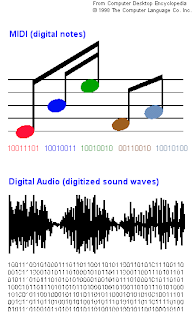
composition has been the focus of computer science since the 50s, and
there exists several ways of representing music using computers.
There have been several AI applications for automatic music
compositions from early ages. When looking at AI applications, they
can be categorized according to their most prominent features;
namely, 1) Neural Networks (systems which learn), 2) Knowledge Based
systems, 3) Evolutionary methods, and 4) Mathematical Models. Each of
these models has their own pros and cons which were discussed in the
above sections.


.png)


